


Choosing a WYSIWYG HTML editor in 2026 is rarely the straightforward exercise that SEO comparisons suggest. Behind the keyword, two radically different categories coexist, sometimes involving tricky licenses and technical debt that only becomes apparent late.
Often too late, during a migration or accessibility audit. This article offers an architect’s perspective: sorting tools by actual use case, exposing hidden costs, and providing a practical decision-making framework.
WYSIWYG in 2026: Why the issue is no longer what it seems

The definition can be summed up in one line. WYSIWYG , for What You See Is What You Get , refers to any editor that reproduces on screen a visual rendering faithful to the final output.
The shift of the last five years has moved the center of gravity. For a long time, the market was structured around the heavyweights based on contenteditable , the browser’s native API: TinyMCE, CKEditor, Froala…
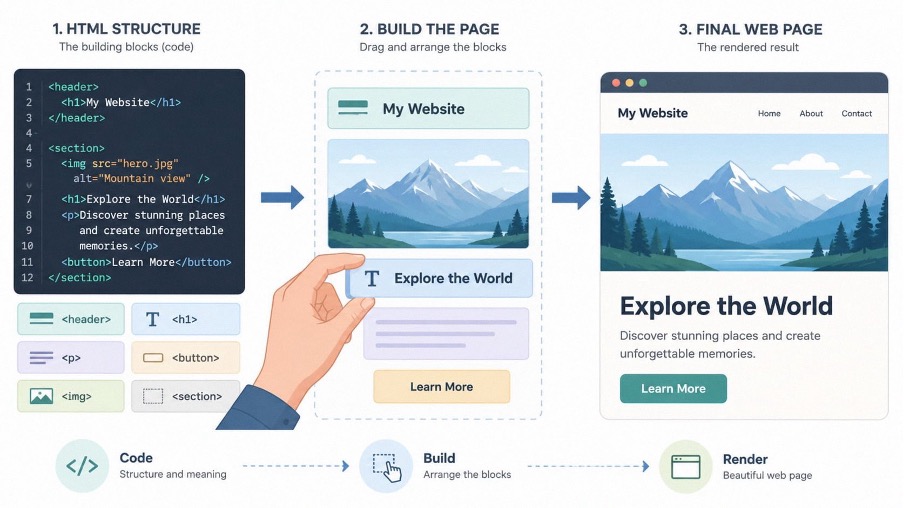
Solid, mature, but stuck in a model where content exists as HTML soup. Then block-based editors changed the game. Editor.js, Tiptap, WordPress’s Gutenberg editor, and the entire “Notion-like” movement now manipulate content as structured blocks, serialized in JSON, where each paragraph, image, or table has its own schema.
This shift changes everything for a front-end developer . HTML ceases to be the sole source of truth; it becomes just one rendering method among many. Portability, real-time collaboration, extensibility through typed plugins, AI pipelines that consume structured content: everything becomes simpler for a structured editor, and much more laborious for a traditional HTML editor.
As you’ve probably gathered, the goal here isn’t to compile yet another top 10 list. It’s about sorting these tools by real-world integration scenarios and production constraints.
Two families, two problems: embedded editor vs. website builder

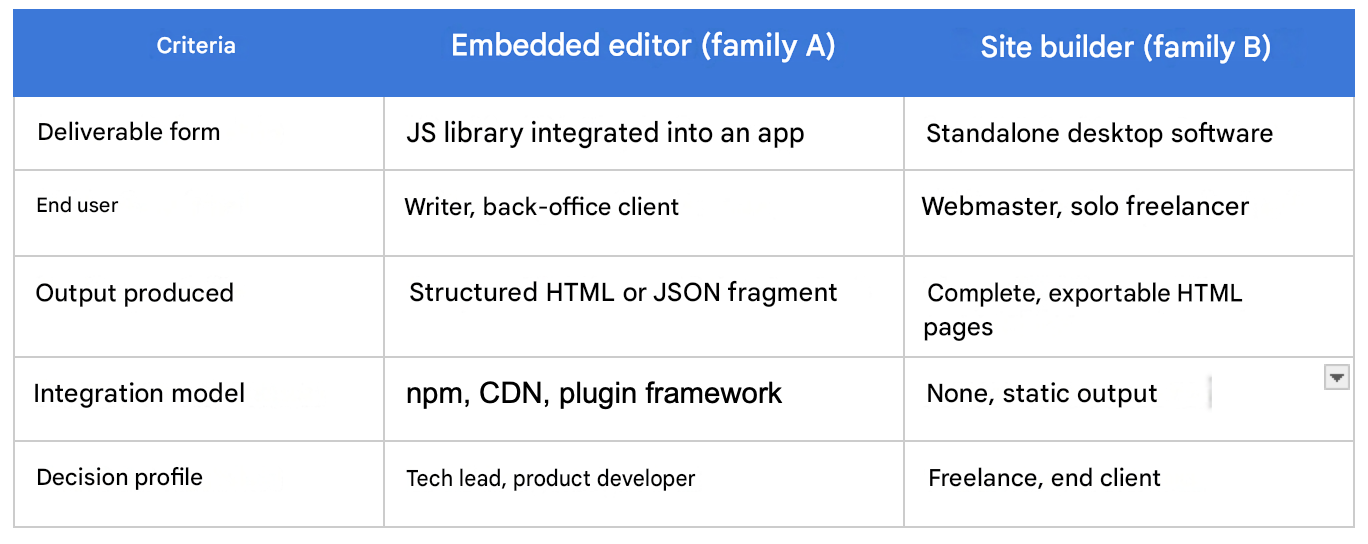
The tools categorized under the label “WYSIWYG HTML editor” actually address two distinct, even opposing, problems.
The A family comprises embeddable rich-text editors. These are JavaScript libraries that developers integrate into their applications to offer end users the ability to produce formatted content.
It includes TinyMCE, CKEditor 5, Quill, Froala, Trix, Tiptap, Summernote, Trumbowyg, Editor.js.
The deliverable is a component, integrated into a back office, a CMS, a SaaS platform, an email client.
The B family includes standalone HTML builders: CoffeeCup, BlueGriffon, Pingendo, and Mobirise. These are desktop applications or suites that generate complete HTML pages, designed to be deployed as is. The deliverable is a website, not a component.
The two worlds have virtually nothing in common. Not in terms of integration, business model, or user profile. Confusing them in a client recommendation is like suggesting an IDE when you’re expecting a word processor. The distinction matters.
Comparative table: embedded vs builder
Carefully selected: Top 6 WYSIWYG
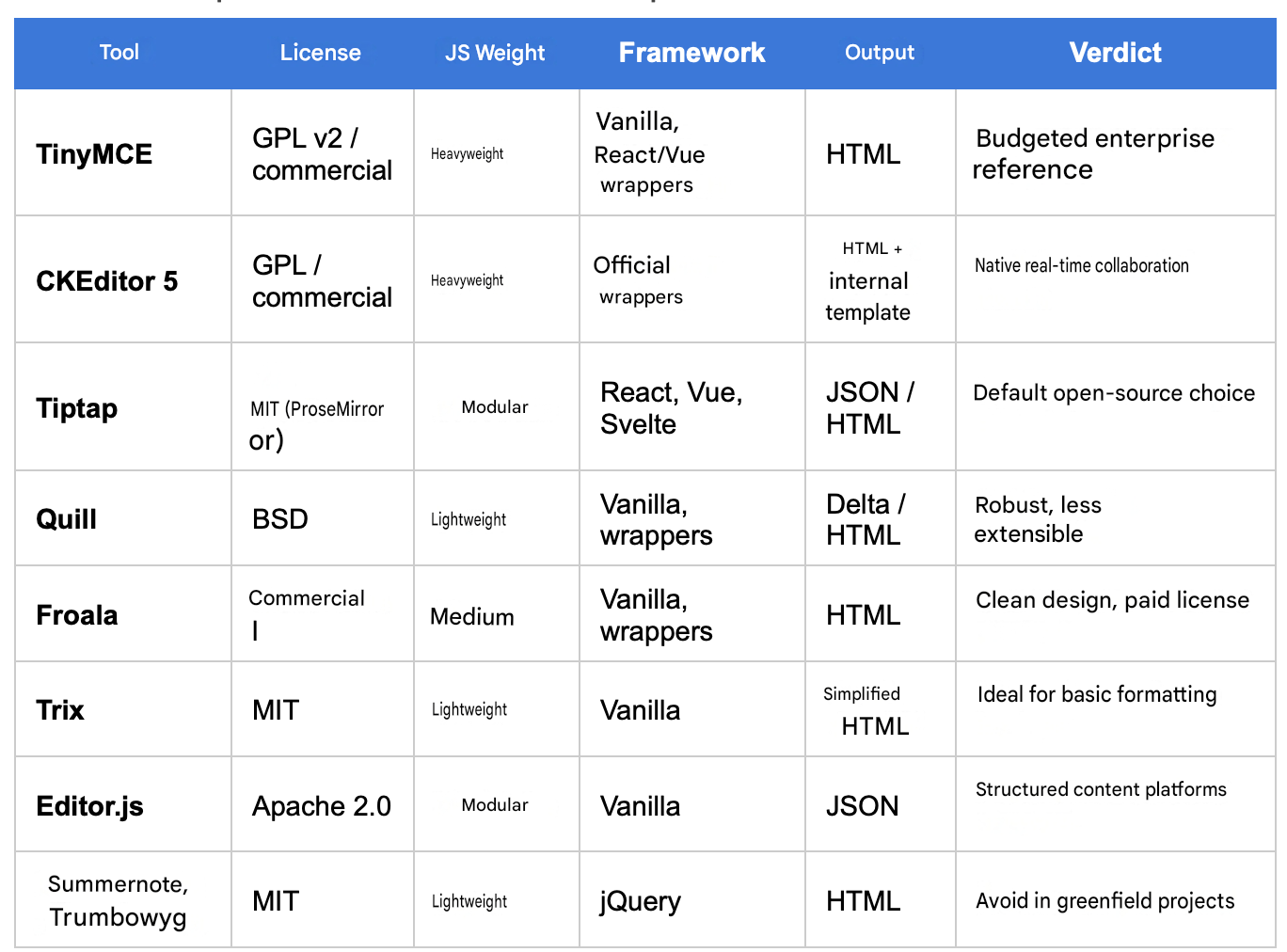
TinyMCE remains the historical benchmark. Mature, extensible, and with impeccable ergonomics for business users. The catch lies in the license: since the switch to GPL v2 strict or commercial licenses, many teams have only recently discovered that standard SaaS usage falls under the paid category. A nasty surprise is guaranteed during budget meetings. Consider this only for enterprise projects prepared to provision the license.
CKEditor 5 offers the same depth of functionality, with a modern architecture based on an internal data model (rather thancontenteditable). Its true differentiator is its native real-time collaboration via the hosted service. The same licensing requirements apply: GPL or commercial, no in-between.
Quill and Tiptap form the winning duo in the open-source world. Quill relies on its own internal representation, deltas . Tiptap is based on ProseMirror, the most respected engine in the editor ecosystem. Tiptap has gained a significant advantage thanks to its first-class integration with React, Vue, and Svelte, and a thriving plugin ecosystem. For a product team that wants complete control over its editor without paying for a license, Tiptap is now the obvious choice.
Froala focuses on sleek design and a simple API. It’s a commercial license from the outset, which immediately excludes projects without a software budget. Attractive, but not for everyone.
Trix comes from Basecamp. Lightweight, opinionated, and perfect when formatting remains basic: bold, italics, lists, links, quotes. For a Rails app or a product that embraces a minimalist UX, Trix is perfectly adequate. Nothing more, nothing less.
Editor.js embodies the pure block-based approach. Released in JSON , it’s an ecosystem of custom blocks, tailored for a structured content platform, a knowledge base, an editorial system where each block has its own rendering logic.
Summernote and Trumbowyg belong to another era. Both rely on jQuery, which makes them unsuitable for any modern project. Avoid them unless you’re consciously maintaining a legacy system.
Summary table of embedded editors
HTML builders: who are these tools still for?
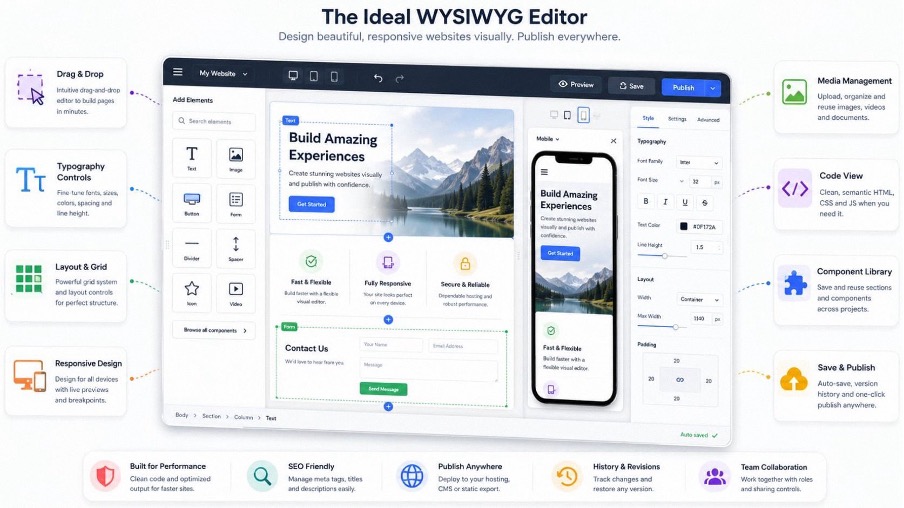
CoffeeCup, BlueGriffon, Pingendo, and Mobirise operate on a different principle. None of them integrate into a product stack. All produce static HTML, sometimes exported with an embedded CSS framework (Bootstrap for Pingendo and Mobirise).
Their remaining audience can be summarized into three profiles. First, generalist freelancers who deliver a showcase website to a very small business and want to avoid WordPress for security or static hosting reasons. Second, traditional web professionals, attached to a desktop workflow without cloud dependencies, as much by choice as by habit. Finally, non-technical business users who produce a landing event or a one-off promotional page.
For almost all other cases, modern builders (Webflow, Framer, Astro with a theme, or simply Next.js on Vercel) offer unparalleled output quality, maintainability and cost of ownership .
Recommending a standalone HTML builder to a client in 2026 requires a solid justification, usually related to a static hosting constraint or an offline workflow.
The hidden costs that no one shows in the demos
This is precisely where the difference lies between a clean integration and a project that goes off the rails six months after production. Do you recognize this situation?
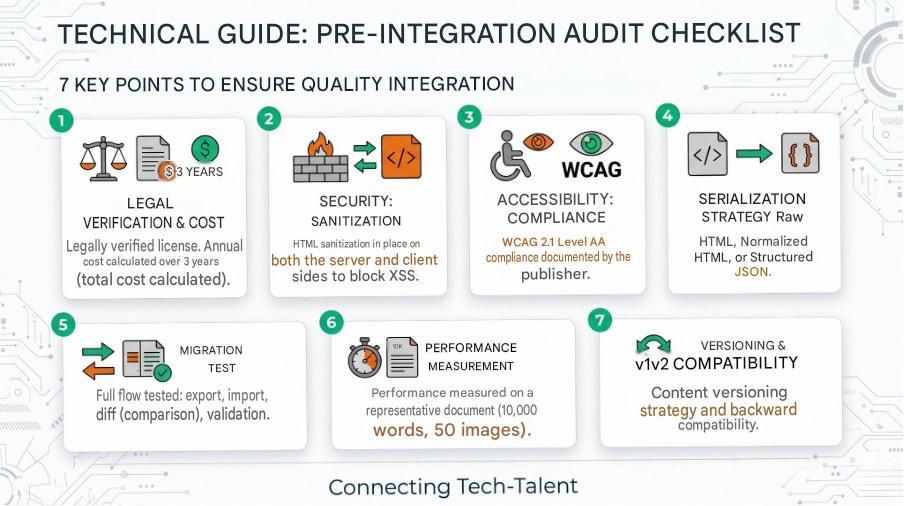
The trap of commercial licenses. TinyMCE and CKEditor cease to be free as soon as the editor is integrated into a non-open-source application. The calculation of the annual cost must be included in the quote from the arbitration phase, not after the proof of concept. A project that starts with the “community” version and moves to production without a license audit accumulates a silent legal debt. The kind that resurfaces at the worst possible time.
Sanitization and XSS. A WYSIWYG editor accepts HTML. Storing this HTML in the database and then rendering it as is creates a manual XSS vulnerability. Sanitization is not optional: DOMPurify on the front end, and an equivalent on the back end if the rendering is server-side. No serious editor dispenses with this layer.
WCAG 2.1 Accessibility. The editor itself must be accessible: keyboard navigation, ARIA, contrast. The generated HTML must also be accessible. Tools differ significantly on this point. CKEditor 5 and Tiptap document their compliance, while others remain vague. For a project subject to the RGAA (General Accessibility Guidelines for Administrations), this issue must be addressed from the outset, never as an afterthought.
The technical debt of the generated HTML. ContentEditable- based editors let through extraneous elements like <span> tags, inline styles, and haphazardly nested tags. Over time, the content accumulates noise that makes migrations painful. Very painful. Internal model editors (CKEditor 5, Tiptap, Editor.js) produce significantly cleaner HTML because they serialize a controlled state rather than what the browser has chosen to write.
The cost of migration. Moving from TinyMCE to Tiptap means rewriting your content: parsing legacy HTML, mapping to the new structure, and quality control. With thousands of articles, the cost can quickly escalate to several weeks. Keep this in mind before signing up for five years.
Decision grid by use case
Three questions are enough to guide the choice in 90% of situations.
Question 1: Should the content be structured, queryable, or simply displayed?
Question 2: Is real-time collaboration part of the scope?
Question 3: What is the licensing budget over 3 years?
From there, the most frequent arbitrations unfold without much surprise.
For a freelancer delivering a custom CMS to an SME , Tiptap or Quill meet the need without requiring a license, offering clean React or Vue integration. TinyMCE Community also works, provided you thoroughly audit license compatibility.
For collaborative B2B SaaS (document management, shared knowledge base), CKEditor 5 with its collaboration service or Tiptap coupled with Y.js are two serious options. The CKEditor license cost often offsets the development time saved on the CRDT layer. Do the math; you’ll be surprised by the result, one way or the other.
For a structured content platform (media, product documentation, reusable block newsletters), Editor.js or Tiptap in JSON mode are essential. HTML becomes a rendering tool, not a source.
For an email template editor , the landscape changes completely. No general-purpose WYSIWYG editor produces correct HTML emails: Outlook compatibility, nested tables, inline styles—the usual mix. Specialized tools like MJML coupled with a custom interface remain the only viable option.
For a one-off landing page delivered to a non-technical client , a visual builder (Webflow, Framer) or an editable static theme far surpasses an embedded HTML editor. There’s no need to bring out the big guns to make a splash.
What will change in the next 24 months?
Three trends are emerging and deserve to be taken into account in any medium-term decision-making.
Augmented AI is becoming a standard feature of the editor. It offers rewording suggestions, inline translation, block generation, and tone control. Tiptap, CKEditor, and TinyMCE have all released their LLM integrations.
The selection criterion is now shifting towards the quality of the AI-side extension hooks, not towards the mere presence of a magic button in the toolbar.
The shift to structured JSON is accelerating . Raw HTML remains useful for rendering, but storage and manipulation now rely on typed trees. Transformation pipelines (mobile rendering, PDF export, semantic indexing, feeding an agent) consume JSON, not a messy <div> tag . Your future customers will thank you.
Real-time collaboration is becoming commoditized through CRDTs, primarily Y.js. What justified an enterprise subscription two years ago can now be set up in a few days on an open-source stack. The competitive advantage of paid vendors in this area is visibly eroding.
Choosing a WYSIWYG HTML editor is never simply a matter of comparing features. It involves a data model, a maintenance roadmap, legal exposure, and technical debt spread over the entire product lifecycle. The soundest decision is one that asks the right questions from the initial planning stages: content structure, collaborative scope, accessibility constraints, and licensing budget. Once the foundations are solid, everything else—toolbar ergonomics, button colors, the number of plugins—becomes secondary.