
Modern software development demands rapid code deployment. Manual security audits can delay delivery.
Attackers are now using AI to carry out one in six breaches, employing tactics such as AI-generated phishing and deepfakes. Organizations using AI-driven security have reduced the breach lifecycle by 80 days and saved $1.9 million per breach. This represents a 34% reduction, demonstrating the increasing importance of AI in defense. – Deepstrik, November 2025
This guide provides expert analysis of the top 12 DevOps security tools to help you choose the best solution.
By evaluating the pipeline integration, implementation costs, benefits, and limitations of each tool, we provide information that goes beyond the advertised claims.
Methodology: How these tools were ranked
To ensure practical value, we evaluated each tool using the following criteria:
- Integration friction: How easy is it to connect to GitHub/GitLab and CI pipelines?
- Signal-to-noise ratio: Will the tool be flooded with false positives, or will it prioritize reachable risks?
- Correction ability: Can you not only find bugs , but also help fix them ?
- Total cost of ownership: A transparent analysis of price and enterprise value.
Top 12 DevOps Security Tools of 2026
These tools are categorized by their primary function within the Shift Left stack.
Category 1: Next-Generation Correction (AI & ASPM)
The future of DevSecOps is not simply finding vulnerabilities, but fixing them.
1. Plexiglass
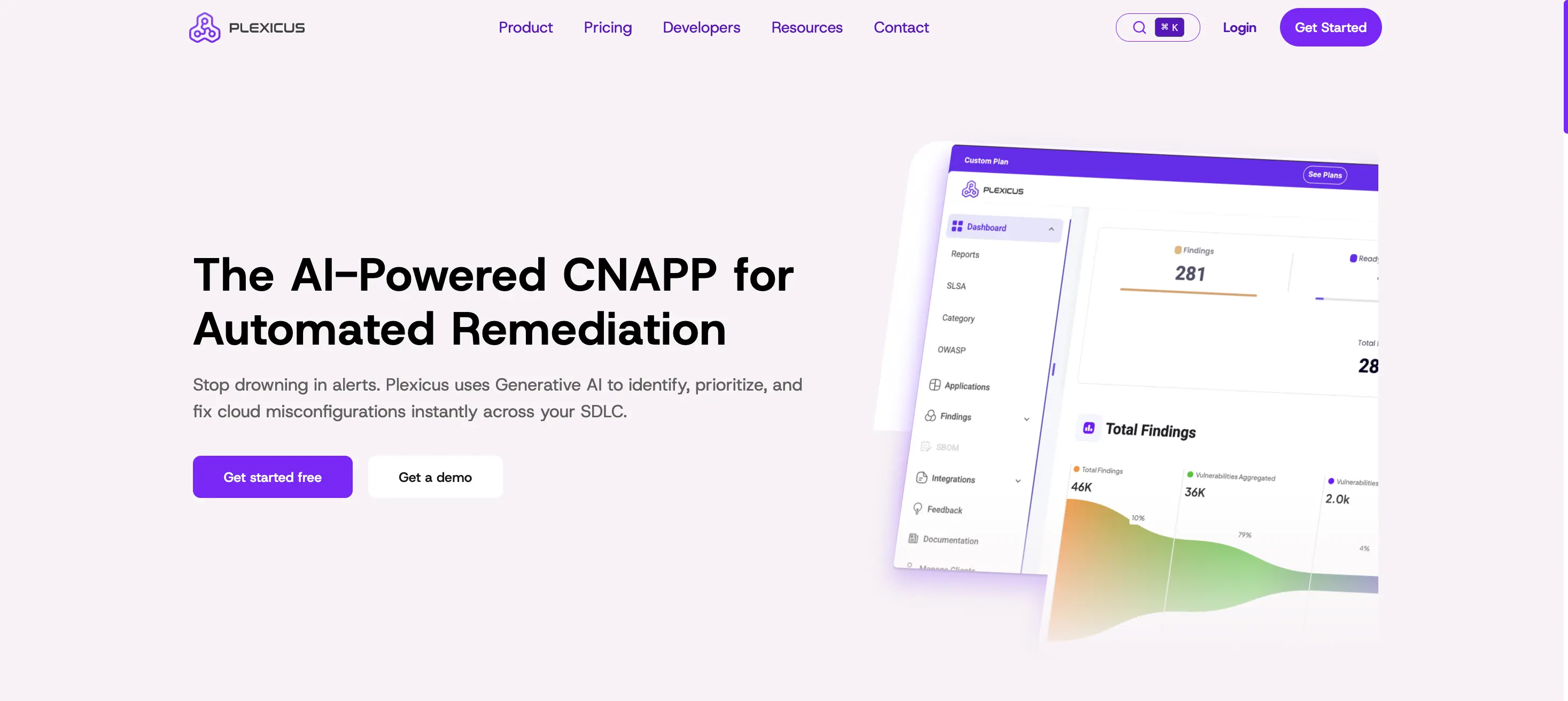
Verdict: Most effective for teams facing a significant alert backlog.
While traditional scanners excel at finding problems, Tara Clouds excels at resolving them. This represents a paradigm shift from ” Application Security Testing ” (AST) to ” Automated Remediation .” Our analysis shows that its AI engine (Codex Remedium) successfully generates accurate code patches for 85% of standard OWASP vulnerabilities.
- Key features: Codex Remedium (AI agent) that automatically opens pull requests including code modifications .
- Price: Free for communities and small startups.
- advantage:
- Dramatically reduced Mean Time To Repair (MTTR).
- By focusing only on reachable and exploitable paths, we filter out the “noise.”
- A unified view of code, cloud, and secrets.
- Disadvantages:
- A cultural shift is needed to trust AI-generated corrections.
- Critical logic is best used in conjunction with a robust manual review process.
- Ideal target: Engineering teams that want to automate the “mundane tasks” of security patching.
Category 2: Orchestration and Open Source
For teams seeking the power of open source without complexity.
2. Jit
Rating: The easiest way to build a DevSecOps program from scratch.
Jit is an orchestrator. Instead of building your own “glue code” to run ZAP, Gitleaks, and Trivy in a pipeline, Jit does it for you. It impressed us by enabling the management of complex security logic with a “security plan as code” approach using a simple YAML method.
- Key Features: Orchestrates top open-source tools into a single pull request experience.
- Pricing: Basic use is free ; Pro starts at **$19/developer/month**.
- advantage:
- Zero-friction setup (takes minutes, not weeks).
- It utilizes an industry-standard open-source engine.
- Disadvantages:
- The reports are less detailed than those from enterprise-grade proprietary tools.
- It is limited by the capabilities of the underlying open-source scanner.
- Ideal for: Startups and mid-market teams seeking a “one-stop shop” solution.
Category 3: Developer-First Scanners (SCA & SAST)
The tools that reside where the code exists, i.e., the IDE.
3. Sneak
Rating: Industry standard in dependency security.
Snyk has changed the game by focusing on the developer experience. It scans open-source libraries (SCA) and proprietary code (SAST) directly in VS Code and IntelliJ. Its vulnerability database is the most comprehensive in the industry, often warning about CVEs days before NVDs.
- Key features: Automated pull requests to upgrade vulnerable dependencies.
- Pricing: Free for individuals ; team plans start at **$25/developer/month**.
- advantage:
- Remarkable developer recruitment due to ease of use.
- A deeper context about why the package is vulnerable.
- Disadvantages:
- Prices for large corporations are rising sharply.
- The dashboard may become cluttered with “low priority” noise.
- Ideal for: Teams that heavily rely on open-source libraries (Node.js, Python, Java).
4. Semgrep
Conclusion: The fastest and most customizable static analysis.
Semgrep feels less like a security auditing tool and more like a developer tool. Its “code-like” syntax allows engineers to create custom security rules in minutes. If you want to ban certain insecure functions across your entire codebase, Semgrep is the fastest way to do it.
- Key features: A custom rule engine with CI/CD optimization.
- Price: Free (Community Edition); Team Edition starts at **$40/developer/month**.
- advantage:
- Extremely fast scan speed (ideal for blocking pipelines).
- Extremely low false positive rate compared to regular expression-based scanners.
- Disadvantages:
- Advanced cross-file analysis (contamination tracking) is a paid feature.
- Ideal target audience: Security engineers who need to enforce custom coding standards.
Category 4: Infrastructure and Cloud Security
It protects the platform on which the code is executed.
5. Spacelift
Conclusion: Terraform is the best governance platform.
Spacelift is more than just a CI/CD tool; it’s a cloud policy engine. By integrating with Open Policy Agent (OPA), you can define “guardrails.” For example, it can automatically block pull requests that attempt to create a public S3 bucket or firewall rules that allow 0.0.0.0/0.
- Main function: Enforcement of OPA policies for IaC.
- Price: From $250/month .
- advantage:
- Prevent cloud misconfigurations before deployment.
- Excellent drift detection capability.
- Disadvantages:
- If you don’t use Terraform/OpenTofu frequently, this is excessive.
- Ideal target audience: Platform engineering teams managing cloud infrastructure at scale.
6. Checkov (Prisma Cloud)
Judgment: Standards for static infrastructure analysis.
Checkov scans Terraform, Kubernetes, and Docker files against thousands of pre-built security policies (CIS, HIPAA, SOC2). It is essential for detecting “soft” infrastructure risks, such as unencrypted databases, at the code stage.
- Key features: Over 2,000 pre-built infrastructure policies.
- Price: Free (Community Edition); Standard Edition starts at $99/month .
- Strong Points:
- Comprehensive coverage across AWS, Azure, and GCP.
- A graph-based scan to understand resource relationships.
- Disadvantages:
- Without adjustment, there is a possibility of increased noise (alert fatigue).
- Ideal for: Teams requiring IaC compliance checks (SOC2, ISO).
7. Wiz
Verdict: Unparalleled visibility into running cloud workloads.
While Wiz is strictly a “right-hand” (production) tool, it’s essential to the feedback loop. It connects to cloud APIs agentlessly and builds a “security graph” that accurately shows how vulnerabilities in containers, combined with permission flaws, create significant risks.
- Key features: Agentless “harmful combination” detection.
- Pricing: Enterprise pricing ( starting at approximately $24,000 per year ).
- Strong Points:
- Introducing zero friction, eliminating the need to install agents.
- Prioritize risk based on actual exposure.
- Disadvantages:
- The high-priced category excludes small teams.
- Optimal: CISOs and cloud architects who require complete visibility.
Category 5: Professional Scanners (Confidential Information & DAST)
A tool specialized in specific attack vectors.
8. Spectral (Check Point)
Rating: Speed daemon for scanning classified information.
Hardcoded sensitive information is a major cause of code breaches. Spectral scans your codebase, logs, and history in seconds to find API keys and passwords. Unlike older tools, it uses advanced fingerprinting to ignore dummy data.
- Key features: Real-time detection of sensitive information in code and logs.
- Price: Business plans start at $475 per month .
- advantage:
- Extremely fast (Rust-based).
- Scan the history for sensitive information that has been deleted but not yet rotated.
- Disadvantages:
- A commercial tool (competing with the free GitLeaks).
- Optimal: To prevent credentials from being leaked to public repositories.
9. OWASP ZAP (Zed Attack Proxy)
Rating: The most powerful free web scanner.
ZAP attacks a running application (DAST) to find runtime vulnerabilities such as cross-site scripting (XSS) and broken access controls. It’s a crucial “reality check” to determine if the code is actually hackable from the outside.
- Main function: Active HUD (Heads-Up Display) for penetration testing.
- Price: Free & Open Source .
- advantage:
- A large community and an expanding marketplace.
- Scriptable automation for CI/CD.
- Disadvantages:
- The learning curve is steep, and the UI is outdated.
- Ideal for: Budget-conscious teams requiring professional penetration testing.
10. Trivy (Aqua Security)
Conclusion: A universal open-source scanner.
Trivy is loved for its versatility. A single binary scans containers, file systems, and git repositories. It’s a lightweight and ideal tool for a “set it and forget it” security pipeline.
- Main features: Scans OS packages, application dependencies, and IaC.
- Price: Free (open source); enterprise platforms differ.
- advantage:
- Easily generate a Software Bill of Materials (SBOM).
- Easy integration with any CI tool (Jenkins, GitHub Actions).
- Disadvantages:
- The free version does not have a native management dashboard.
- Ideal for: Teams that need a lightweight, all-in-one scanner.
Threats: Why are these tools necessary?
Investing in these tools is not just for compliance, but to protect against attacks at specific code levels.
- “Trojan horse”: An attacker hides malicious logic within a seemingly useful utility.
- Defense methods: Semgrep,.
- “Open Door” (Misconfiguration): Terraform accidentally makes the database public.
- Defense measures: Spacelift, Checkov.
- “Supply Chain” Poison: Libraries like LeftPad and xz have been compromised.
- Defense measures: Snyk, Trivy.
- “The key under the mat”: Hardcode the AWS key into the public repository.
- Defense method: Spectral.
From detection to correction
The narrative for 2026 is clear: the era of “alert fatigue” must end. As supply chains become more complex and deployment speeds increase, we are witnessing a definitive split in the market between finders (traditional scanners that create tickets) and fixers (those that close it with AI-native platforms).
To build a winning DevSecOps stack, tailor your tool selection to your team’s immediate bottlenecks.
- For teams overwhelmed by backlogs (efficient gameplay): It solves labor shortage problems by shifting from identification to automated repair. Its generous community plan makes it a logical starting point for startups and teams ready to embrace AI-driven patching.
- For teams starting from scratch (speed play):Jit offers the fastest “zero to one” setup. If you don’t have a security program today, Jit is the quickest way to orchestrate open-source standards without managing complex configurations.
- For platform engineers (governance play):Spacelift is the gold standard for cloud control. When the primary risk lies in infrastructure misconfiguration rather than application code, Spacelift’s policy engine leaves no room for negotiation.
Final recommendation:
Don’t try to implement all the tools at once. High friction will lead to failed adoption.
- Crawl: First, secure the “low fruit.” Dependency (SCA) and secrets.
- Run: As the infrastructure expands, we add layers of deep cloud governance (Spacelift/Wiz).